Launch freezes, near-imovable settings, a long unskippable opening, and save backups before a risky fight. Known issues and workarounds.
Sengoku Rance Freeze, Crash and Save Problems: What Actually Helps
Nearly every "Sengoku Rance freeze" report from launch week comes down to one of three things: the unskippable opening playing over a black screen, a 2006-era engine that assumes a mouse, a keyboard and a 1280x768 window, or an unbacked save file. Real bugs exist but are rare — the Steam build released Oct 1, 2026 has shipped no patch notes.
Sources are the English Steam review feed (100 most recent, pulled 2026-10-03), the store's metadata, and the AliceSoft community wiki — which documents the 2006 Japanese original (v1.04) and the MangaGamer 2019 English release, both older builds.
Official source: Sengoku Rance on Steam — the store page itself warns "Lag may occur from loading menus or maps. Turn off other programs before running the game." It carries no support documentation and no known-issues list, so the community wiki remains the only detailed technical reference.
Quick triage: what is fixable and what is not
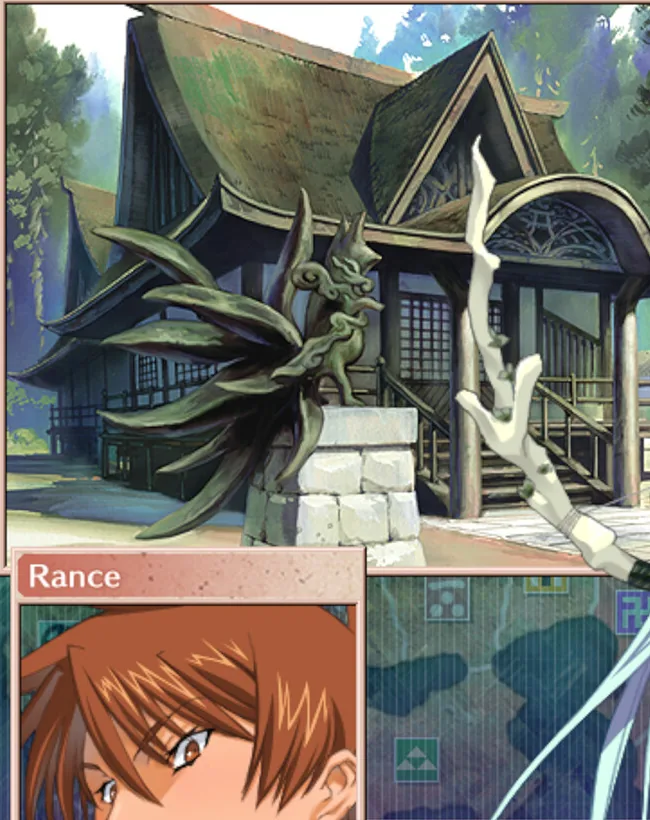
Everything below is about whether the game gets as far as drawing a screen at all. This is the first thing that has to work: a location scene with the map menu behind it.
| Symptom | What players actually report | Fixable? | Do this |
|---|---|---|---|
| Black screen with audio on launch | Nothing helped until the reporter waited for the opening to finish | Yes | Wait it out; check the Deck case below if you are on Linux |
| Opening cinematic cannot be skipped | English reviewer: "You can't skip the opening LONG cinematic each time" | No | Plan for one long sit-through after install |
| No volume slider, almost no settings | Same reviewer: "you can barely adjust any settings at all in the game which is weird in 2026" | No | Use the Windows per-app mixer |
| Window cannot be resized (Japanese build) | Japanese reviewer: the build is too old to change window size | No | Fixed window, not fullscreen |
| Controller does nothing | No full gamepad support declared for this build | No | Keyboard and mouse only |
| Old save copied in, saves reset | Third-party tool reports fatal errors and an emptied save directory | Yes, with a converter | Never copy old saves raw |
| Lost a boss fight | Penalty screen offering a retry for 4 score points | Recoverable | Buy the retry; the run is not over |
| Run ended with no warning | Rance's own unit was wiped in combat | Fatal | Back up before every boss attempt |
The launch black screen with no window
The most-reported launch problem is not a crash: the game starts, you hear audio, the screen stays black. One Chinese-language review describes trying compatibility modes and launch options before finding the answer — do nothing, let the opening audio finish, and the interface appears.
That fits the store page's own note about lag while loading menus and maps.
On a black screen with sound, do not quit and do not relaunch. Leave the window alone as long as the audio runs. If nothing happens after the audio stops, close it and relaunch once — players report success on the second attempt, not after a reinstall.
A separate, genuinely broken case exists on the Simplified Chinese build under Proton: Steam reports the game running but no window opens. A community patch — Sengoku Rance Deck Fix (MIT, created 2026-10-02) — changes four bytes of the executable, verifies its SHA-256 and keeps the original as a backup. Its README says "Tested on Linux with Proton Experimental. Steam Deck hardware testing is pending", and Steam updates may remove the fix. It is a community tool, not an official one; the Steam Deck page covers the platform.
The opening cinematic and the settings that are not there
One English reviewer is blunt about the startup: "You can't skip the opening LONG cinematic each time from what i can tell when you start up the game." Other launch-week reports contradict that and say later launches went straight to the menu. Budget for it once after a fresh install; do not expect a skip that reliably exists.
Settings are thinner: the System menu holds save and load plus an Environment Settings dialog for message skipping and similar toggles. There is no audio mixer and no graphics panel. Historical context explains why. The MangaGamer 1.07 patch notes (community wiki, covering the 2019 English release) list fixes for exactly this class of problem: start-time crashes caused by "Perform Noise Reduction", which was therefore forced off; music-playback crashes, fixed by upgrading the SACT audio engine to Beat Blades Haruka; and, in 1.05, a "Mouse stuck freeze after dragging commanders or items to the left side of the screen".
The same 1.01 patch fixed a freeze when the Takeda clan's blitz attack had no adjacent territory to strike. Nothing public shows which fixes were rebuilt for the 2026 package, so treat old bug lists as history, not as this build's changelog.
Controller support: there is none
Package metadata for this build declares controller: full_gamepad = false, and the Steam feature list holds only Single-player, Steam Cloud and Family Sharing. It is a mouse-and-keyboard game throughout — menus, drag-and-drop unit management, map commands — and remapping software cannot add button support the game never had.
The absence of achievements is equally official: the store page's category list has no achievements entry, covered in the achievements page. Community discussion features are locked down per launch-week reports, and there is no Steam Workshop; the mods page explains how mods work without one.
Save safety: protecting a 100+ turn run
A full run is long, and the failure states punish anyone who assumes saves are safe. Per the community wiki — describing the 2006 v1.04 / MangaGamer 2019 builds, not the Steam package — four things can cost you the run:
| Failure | What happens | Recoverable? |
|---|---|---|
| Boss fight lost | Alice's Mansion: take a Game Over, or retry for 4 score points | Yes, if points remain |
| Rance's own unit wiped in combat | Rance is killed at the end of that battle and you get a GAME OVER | No |
| Dungeon final floor lost | Cleared floors reset to floor one, or to that dungeon's checkpoint | Yes, at the cost of re-clearing |
| Archfiend route entered | Unwinnable by design; the game tells you to restart and scores nothing for clearing it | No |
Boss retries cost score points, a wiped Rance unit ends the run outright, and the Archfiend route is a hard fail you trigger by missing a condition — the walkthrough notes you enter it if you fail to get the Hirami Lemons for Miki or fail to find her after her disappearance. Copy your save to a dated name before each of these, and keep the previous copy instead of overwriting it. The game has many slots but no save versioning, so the history exists only if you make it.
Two rules follow. Treat Steam Cloud as transfer, not backup: it mirrors the current file, not earlier turns. And never copy a save from an older build into the Steam install. A third-party converter's documentation (sengoku-rance-save-converter, GPL-3.0, created 2026-10-02, zero stars at time of writing) explains why: 2006 builds identify saves with an 18-byte Shift-JIS key and the Steam build uses a 15-byte ASCII key, which shifts the five data-block offset pointers in the System 4.0 save header and makes the engine treat the file as corrupt — reportedly resetting the whole save directory to empty defaults. It also notes saves occupy slots 1 to 48 in a file called Rance7_Sys.ASD.
PCGamingWiki and SteamDB, the two sources that normally publish one, were unreachable during research (HTTP 403 from both). Do not trust a path quoted from a random wiki or a 20-year-old guide — use the System menu, or let Steam show you the install folder, and confirm the file is there.
The version differences page covers the renamed systems that catch returning players out; routes covers what a fresh save can reach, and dungeons the floor-reset rule.
Frequently Asked Questions
Is the game crashing, or is the opening just slow? Almost certainly the opening. Black screen plus audio still playing is not a crash in launch-week reports; a crash is a silent process or an instant close.
Can I skip the opening? There is no reliable skip. Assume one sit-through after installing.
Does it support controllers at all? No. The build declares no full gamepad support, including for drag-and-drop unit management.
Why can I only save from a menu? Saves live in the System menu, and one Chinese-language reviewer names "you cannot save at any time and place" as the build's biggest shortcoming. There is no quick-save mid-battle, which is exactly why pre-boss backups matter.
Will my 2006 or fan-patch save work in the Steam version? Not if you copy it in directly — the save key and header layout differ, and reports say the engine wipes the directory. Convert first, back up before and after, or start fresh.
More Sengoku Rance Guides
The first playthrough forces the canon ending. Here is what unlocks after it, how ending points work, and what still takes several runs.
Rough hours for the mandatory first route, what forces a second playthrough, and why 100% takes far longer than the first clear. Numbers, not vibes.
Capture odds are a 1-in-n roll, and n is 1, 2 or 5. The two skills that set it, the prison cap that blocks it, and how to raise the odds.
Action fans cap your whole turn. The thresholds are 50, 160 and 260 - here is how to reach each one and what to pick on the way.
Five item colours, five different rules. Learn the coding once and you can read every drop, shop entry and transfer item at a glance.
There is no Steam Workshop for this game. What the well-known external total conversion adds, and what to check before you install anything.
Points come from your best score plus 5 per winnable route. What to buy first, the roster cap that can kill your units, and National Mode.
Negotiation stat, prison space, NP cost and the ronin pool. Why your scout command is greyed out and how to unblock it.